
Getting Started
Format text with the rich-text editor
What this does
The same editor runs in every rich-text field in WindoorERP —
description fields, internal notes, email bodies, knowledge articles. Two
ways in: select text for the toolbar, or type / for the
powerbox.
Steps
Shortcuts save the trip to the toolbar: Ctrl/Cmd
+ B, I or U for bold, italic and
underline; typing 1. or A) starts a numbered
list; * or - starts a bulleted one.
-
01
Click into the field and start typing.
-
02
Select a word or a paragraph — the toolbar appears above it.
-
03
Set the style (Header 1 to Header 6, Normal, Code, Quote), the size, and bold, italic or underline.
-
04
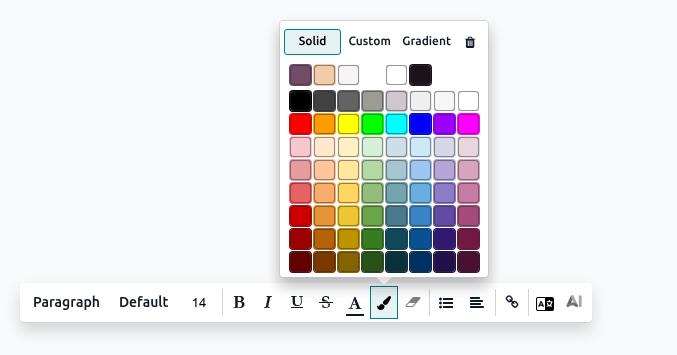
Use the colour buttons for font and background colour, picking a preset or a custom value.
-
05
Click the (expand) icon for the rest: font family, strikethrough, remove formatting, lists, and alignment.
The powerbox
Type / anywhere in the text and search the command by
name. What you get:
- Structure — separator, 2/3/4 columns, table, bulleted, numbered and check lists, toggle list.
- Format — headings, plain text, quote, code, switch direction (which is how you mix Arabic and English in one note).
- Banners — info, success, warning and danger callouts for the thing readers must not miss.
- Media — insert an image or icon, or upload a file as a download box.
- Navigation — link, button, table of contents.
- Widgets — emoji and 3- or 5-star ratings.
Hovering any block reveals a ⠿ (drag) handle: grab it to move the block somewhere else in the text. Hovering a table row or column reveals its own menu for inserting and deleting.
Images
Type /Media, then choose Images,
Documents, Icons or
Videos (paste a YouTube or Vimeo URL). Click an inserted
image to get its own toolbar: preview, description and caption, rounded
or circle shape, shadow, border, padding, resize to 25/50/100 %, crop,
add a link, replace, or delete.
Common mistakes
- Pasting formatted text from Word or a web page and inheriting its fonts and colours — paste, select, then Remove Format.
- Building a layout out of blank lines instead of headings and separators; it falls apart in the emailed version.
- Uploading a 5 MB photograph into a description field that only needed a thumbnail.
Was this article helpful?
Thanks — your feedback helps.
Running a window or door factory?
Ask for a demo