
General Settings
Install, upgrade, or remove an app
What this does
Adds an application to your WindoorERP database, updates it, or takes it out again — all from the Apps dashboard.
Before you start
- Only an administrator can change the installed apps.
- Apps have dependencies: installing one may pull in other apps that are technically required, even if nobody opens them.
- Adding apps changes how much of the database you use. If your WindoorERP plan is close to its limits, ask info@windoorerp.com before installing a large app.
- Test unfamiliar apps on a copy of your database first — never on the live one.
Steps
By default the dashboard shows applications only. To search technical modules as well, add the Extra filter from Filters.
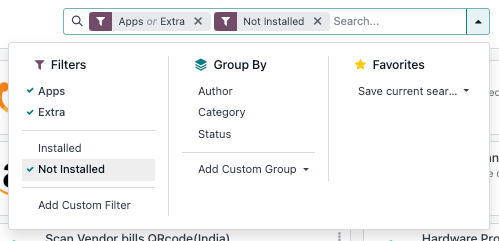
If the app you need is not listed at all, activate developer mode, go to Apps › Update Apps List and click Update.
-
01
Open the Apps dashboard from the apps menu.
-
02
Search for the app by name, or scroll the list to find it.
-
03
Click Activate on the app's card.
-
04
Wait for the page to reload — the new app appears in the apps menu.
Upgrade an app
Upgrading re-applies the newest version of an app that is present on the server: new fields, views, and menus are loaded into your database. WindoorERP ships those new versions to the server for you, so use this when support asks you to, or after a new release is announced.
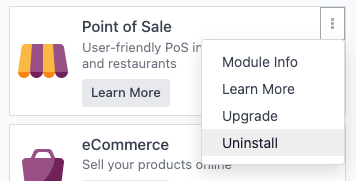
Go to Apps, click the ⋮ (vertical ellipsis) icon on the app's card, and select Upgrade.
Remove an app
- Go to Apps, click the ⋮ (vertical ellipsis) icon on the app's card, and select Uninstall.
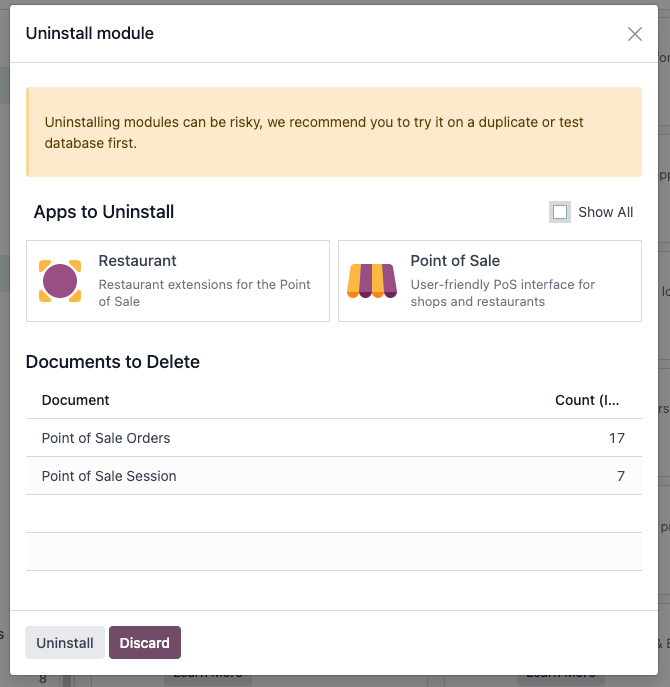
- Read the Apps to Uninstall section — it lists every app that goes with it. Tick Show All to see the module dependencies too.
- Read the Documents to Delete section — those database records are deleted, permanently.
- Click Uninstall to confirm.
Common mistakes
- Uninstalling to "clean up" a live database — uninstalling deletes the app's records with it, and no undo exists. Try it on a copy first.
- Removing an app another one depends on: uninstalling Sales, for instance, takes everything built on top of it with it.
- Assuming an app is broken because it is missing from the list — update the apps list first.
Was this article helpful?
Thanks — your feedback helps.
Running a window or door factory?
Ask for a demo