
إعداد شركتك وفروعها
العمل في قاعدة بيانات متعددة الشركات
What this does
One database can hold several companies. Some data is shared between them, the rest stays separate, and an authorized user can work across them without switching databases or re-typing anything.
Steps
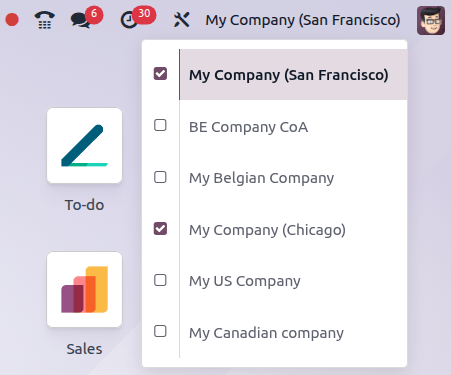
-
01
Click the company selector in the top-right corner of the header.
-
02
Tick the checkboxes next to the companies you want active.
-
03
The highlighted company is the one you are working in — new records are filed there.
-
04
Click another name in the list to make it the active one.
Which settings are shared
Most settings in the Settings app apply to the whole database. The ones that do not are marked with the 🏢 (Values set here are company-specific) icon, and can also be edited from the company record itself.
Shared and company-specific records
- Leave the Company field empty and the record is available to every company.
- Fill it in and the record is only visible to users working in that company.
- New products and contacts are shared by default; quotations, invoices and bills always belong to the company that created them.
- Even inside one shared record, some values are shared and some are not: a product's Sales Price and Reference are common, while its Cost is per company.
Archive a company
- In the Settings app, open Manage Companies.
- Select the company in the list.
- Click Actions and choose Archive.
- Confirm with Archive.
Inter-company transactions
When one of your companies sells to another, WindoorERP can write the counterpart document automatically. Select the company in the selector, open Settings › Companies, enable Inter-Company Transactions, and choose what to generate:
- Create Vendor Bills — a bill or refund appears when the other company posts an invoice or credit note.
- Create Sales Orders — a draft quotation appears when a purchase order is confirmed for this company.
- Create Purchase Orders — a draft RFQ appears, using the warehouse named in Use Warehouse, when a sales order is confirmed.
- Synchronize Stock Moves — deliveries and receipts between the two companies stay in step.
Choose Validated to have the counterpart documents confirmed instead of left in draft. The same options live on the Inter-Company Transactions tab of the company form in developer mode.
Common mistakes
- Splitting one business into two companies to keep a product line apart. Analytic accounting and a second warehouse usually do the job without doubling your chart of accounts.
- Expecting warehouses to appear for a company created after the initial setup — they have to be created by hand.
- Turning on inter-company transactions before the accounting, fiscal positions and localizations of both companies are right.
هل كان هذا المقال مفيداً؟
شكراً — ملاحظتك تساعدنا.
تدير مصنع نوافذ أو أبواب؟
اطلب عرضاً تجريبياً