
البدء
استيراد السجلات من ملف
What this does
Loads contacts, products, prices, opening balances or any other records into WindoorERP from a spreadsheet — the fastest way to set up a new database, and the only sane way to change hundreds of records at once.
Before you start
- An import cannot be undone. Test on a copy of the database when the file is large or unfamiliar, and keep the file.
- Import related records first: categories before products, companies before the people who work for them.
- Very large files time out. Split them into batches of a few thousand rows.
Steps
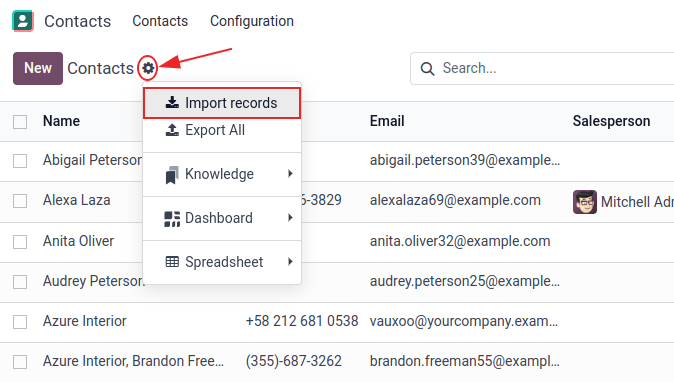
-
01
Open the list view of what you are importing, click ⚙ (Actions) and choose Import records.
-
02
Download the ready-made template offered on the page, or start from a file of your own.
-
03
Click Upload Data File and select it.
-
04
For a CSV, check the Formatting options — separator, text delimiter, encoding, date format.
-
05
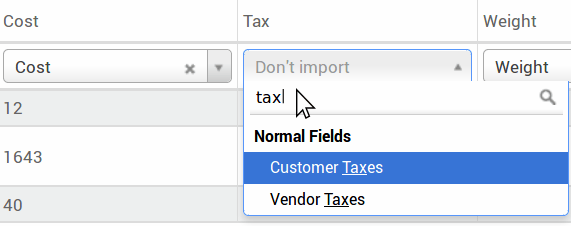
Check every File Column is mapped to the right Odoo Field; fix the ones the mapping guessed.
-
06
Click Test. Fix what it reports, and test again.
-
07
Click Import.
Prepare the file
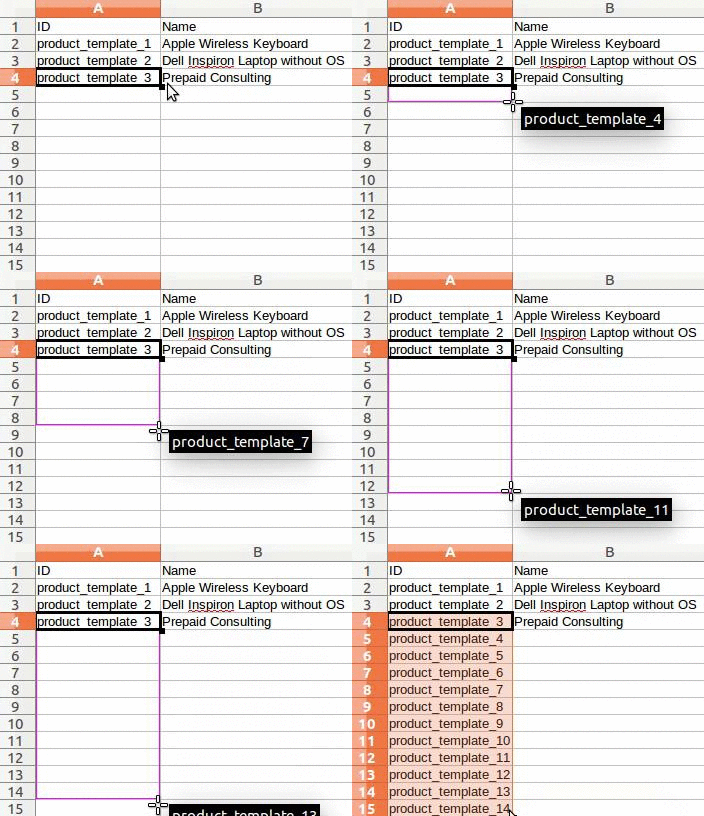
Add, remove and reorder columns to match your data, but keep the External ID column: it is the handle the system uses to recognise a record next time. Give every row a unique value — drag the first one down the column and the spreadsheet numbers the rest.
If a column will not map, use the label the export tool produces for that field — exporting a sample of the same records is the reliable way to learn the right names.
Linking to other records
A field that points at another record can be given three ways, and you must pick one per column:
- Country — the name or code, e.g.
Qatar. Easiest for hand-made files. - Country/Database ID — the internal number. Unambiguous, but developer territory.
- Country/External ID — the identifier from the
system you are migrating from, e.g.
base.qa. Use this when importing from another application.
Prefix external IDs from an old system with its table name
(company_1, person_1) so two tables cannot
collide. Many2many values — tags, for instance — go in one cell separated
by commas with no spaces. For one2many lines, such as the lines of an
order, give each line its own row and leave the order columns empty on
all but the first.
Numbers, dates and images
- Dates are safest in ISO format,
YYYY-MM-DD. A01-03-2026is guesswork. - Numbers may carry currency symbols and either separator; parentheses mean negative, and the symbol must sit inside them.
- To bring images in, put the file names in the image column, upload the files under Files to import, then test and import.
Update records instead of creating them
If the file carries an External ID or Database ID column, matching records are updated, not duplicated. That makes the round trip — export with import-compatible ticked, edit in a spreadsheet, import back — the standard way to correct hundreds of records at once. Keep those IDs untouched while you edit.
Common mistakes
- Skipping Test. It costs seconds and catches the mistakes that would otherwise need cleaning up by hand.
- Editing or deleting the External ID column between two imports — the system stops recognising the records and creates duplicates instead.
- Leaving a cell empty and expecting the default value: an empty cell writes an empty value.
- Importing products before their categories exist.
هل كان هذا المقال مفيداً؟
شكراً — ملاحظتك تساعدنا.
تدير مصنع نوافذ أو أبواب؟
اطلب عرضاً تجريبياً